Direct answer
AI trading automation is the use of AI-assisted interfaces and automation rules to prepare trading workflows. The important word is prepare. The system can translate a command into structured fields, check broker readiness, apply risk controls, and return a preview. Live execution should require user confirmation.
This is different from a signal service or a promise that an AI will find profitable trades. A safe product does not claim automatic profit generation. It focuses on operational control: fewer manual steps, clearer previews, and better auditability.
Why it matters
Broker-connected workflows can move faster than manual platforms. That speed is useful when a user already knows what they want to do, but it is dangerous when the system guesses. AI can misunderstand a vague instruction, infer missing fields, or produce an order shape that looks plausible but is not what the trader intended.
The right design uses AI for interpretation and deterministic software for validation. The user should see the exact action before anything goes live. This makes the workflow faster without turning it into blind automation.
Step-by-step safe workflow
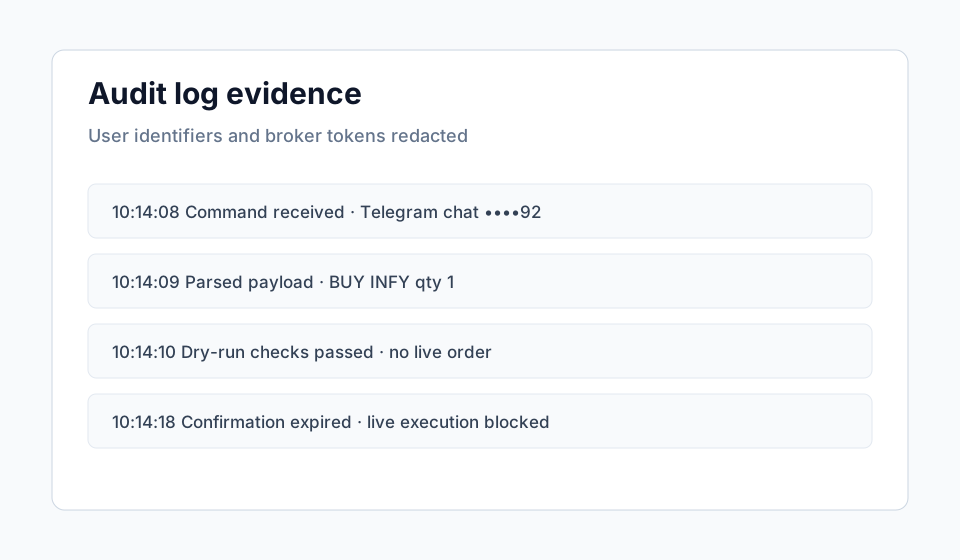
A safe workflow has six stages: command, parse, validate, preview, confirm, audit. The command may come from Telegram or a web interface. The parse step extracts side, symbol, quantity, order type, product, and price. The validation step checks symbols, broker readiness, limits, and duplicate risk. The preview step shows a dry-run receipt. The confirmation step binds the user to that exact payload. The audit step records the event.
If any stage fails, live execution should stop. The system should explain the blocker instead of encouraging repeated retries.
Dhan and Telegram example
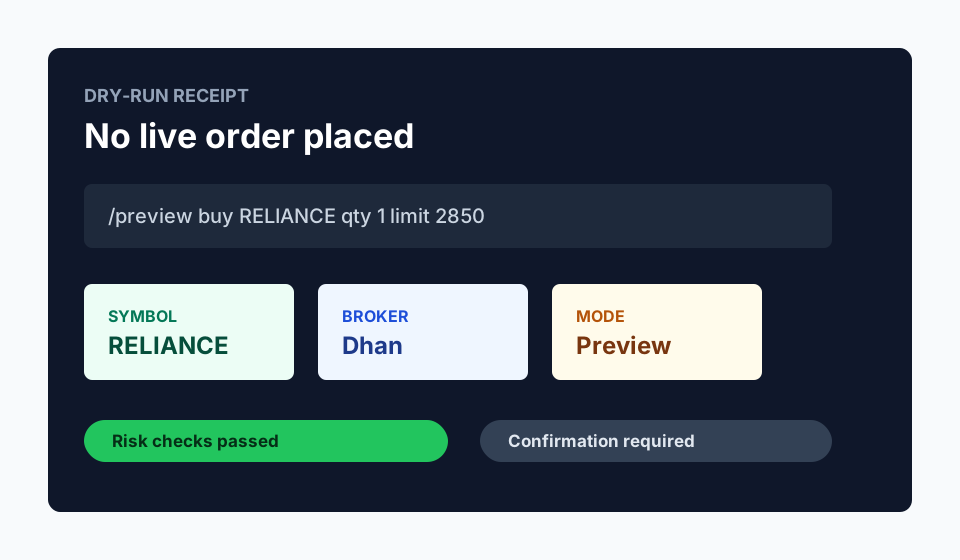
A user sends /preview buy RELIANCE qty 1 limit 2850. Vantaro parses the command, resolves the symbol, checks Dhan readiness, applies order-value limits, and returns a dry-run receipt. The receipt states that no live order has been placed.
If the user confirms, the backend verifies that the confirmation token is current and matches the same payload. If Dhan credentials are expired or static IP readiness is incomplete, the live path remains blocked and the user receives a setup explanation.
Common mistakes
The common mistakes are treating AI output as advice, skipping dry-run mode, using ambiguous commands, exposing broker tokens in screenshots, and letting old confirmations remain valid. Each mistake is preventable with a clear product rule.
The safest default is dry-run first. A trader can still move quickly, but speed does not come at the cost of review.
Evidence and screenshots to add before final publication
FAQ
Is AI trading automation investment advice?
No. This article explains workflow automation and risk controls, not trade recommendations.
Can AI automate execution?
It can assist the workflow, but live execution should require deterministic validation and explicit user confirmation.